Abstract:Interactive Brokers (IBKR) is thrilled to offer IBKR Desktop, the future of desktop trading. This cutting-edge trading platform has a simplified user interface that makes trading simpler and more efficient than ever before.
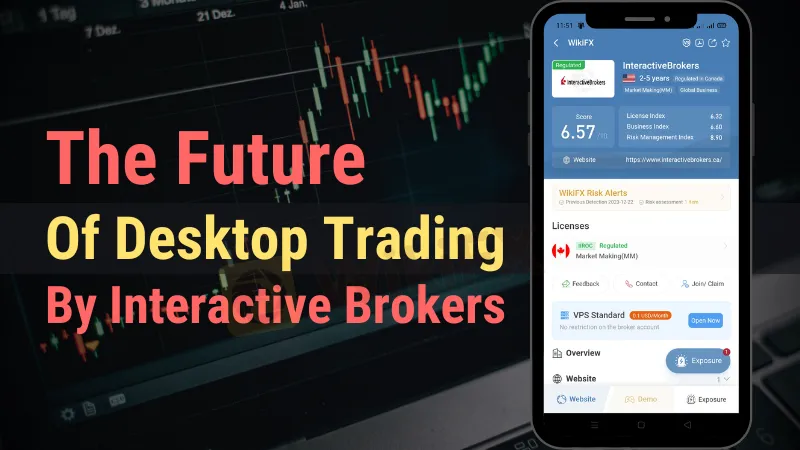
Interactive Brokers (IBKR) is thrilled to offer IBKR Desktop, the future of desktop trading. This cutting-edge trading platform has a simplified user interface that makes trading simpler and more efficient than ever before. IBKR Desktop, with an emphasis on user-friendly navigation and superior services, is poised to change the way traders interact with the market.
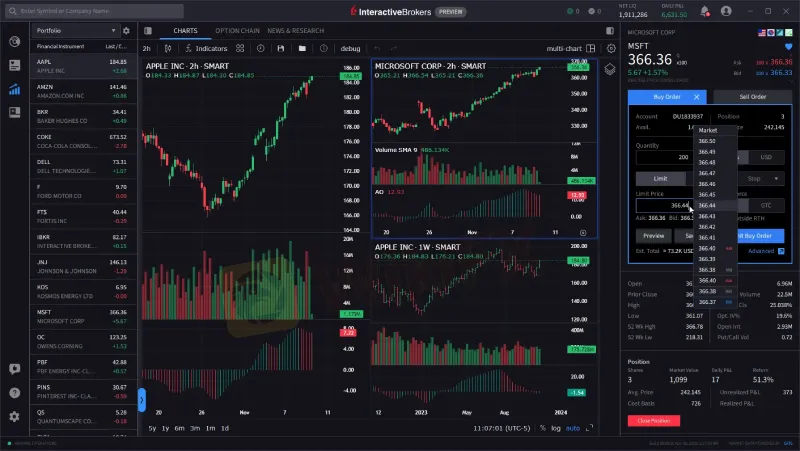
Interactive Brokers is well-known for offering competitive pricing, order execution, research, and market data. IBKR Desktop takes these characteristics to the next level by offering an unparalleled trading experience. Users may already get a taste of what's to come while the platform is still in preview mode and under development.
 Contents
What Does It Look So Far?
Interactive Brokers values user feedback and is actively seeking input from traders as they continue to refine and expand IBKR Desktop. The initial version of the platform may have limitations, but IBKR welcomes your comments on what's working well and what improvements you'd like to see.

Here's a glimpse of the features already available:
1. Rapid Order Entry: Trade quickly and efficiently using the streamlined Rapid Order Entry panel. Create orders directly from the Price panel or within Watchlists and Option Chains. Adjust limit prices with ease using the Price Wand. For more advanced options, the full Order Ticket is also available.
2. Attached Orders: Take advantage of Stop Loss and Profit Taker orders by attaching them to your trades in the Order Ticket. These features are supported in both Rapid Order Entry and the full Order Ticket.
3. News & Markets: Stay informed with customizable News, Research, and Markets content accessible through the left navigation panel. Simply click on “News” to access the latest updates.
4. Advanced Charts: Enjoy Advanced Charts that support multi-chart layouts, allowing you to view up to eight different charts simultaneously. Optional synching for instruments, periods, and intervals, as well as a crosshair feature, make chart analysis a breeze.
5. Options Trading: Create options orders effortlessly with Option Chains and explore multi-leg combinations using the Strategy Builder. Toggle between List and Tab views, and mirror option chain columns with a single click.
6. Derivatives Tools: IBKR Desktop offers various derivatives tools, including the Performance Profile, Option Rollover, Exercise/Lapse Options tool, and support for trading options on futures.
7. Column Customization: Customize your trading experience by creating custom views or selecting from pre-defined system views with specific column sets. This feature is available for Option Chains, Watchlists, and Portfolios.
8. Fundamentals Explorer: Elevate your research with the Fundamentals Explorer, a powerful tool that provides in-depth insights into market fundamentals.
9. Hotkeys: Boost your efficiency with keyboard shortcuts that allow you to perform common order creation and platform actions, such as buy, sell, cut and paste, and more. You can even create custom hotkey combinations for frequently used actions.
10. Search Functionality: Quickly locate instruments using the Search function in the title bar. Supported assets include stocks, ETFs, options (single and multi-leg combos), futures, and funds.
11. Notification Center: Stay informed with Market and Price Alerts, Trade Notifications, and FYI management in the Notification Center. Receive pop-up Trade Notifications when an order fills.
What's on the Horizon?
While IBKR Desktop v0.06 introduces several exciting features such as
Attached are Stop Loss and Profit Taker orders
Pop-up Trade Notifications
News & Markets page
Fundamentals Explorer tab added to Quote page

Interactive Brokers has even more in store for future releases. Here's a sneak peek of what's coming next:
Advanced Options Tools: Enhancements to options trading capabilities.
Custom Layouts: Tailor the platform layout to suit your preferences.
More Rapid Order Entry Enhancements: Additional improvements for even faster order execution.
Table Customization: Customize tables to display the data you need.
Additional Order Types: Expand your trading options with new order types.
Additional Product Types: Access a broader range of financial products.
Level II Market Depth: Dive deeper into market data with Level II market depth insights.
Market Screeners: Discover trading opportunities with powerful market screening tools.
Stay Ahead with IBKR Desktop
Interactive Brokers is dedicated to delivering traders with cutting-edge tools and services that will allow them to prosper in today's fast-paced financial market. Traders can look forward to a future of desktop trading that is straightforward, efficient, and filled with tools to help them succeed with IBKR Desktop.
Don't lose out on the trading future—try IBKR Desktop now and be a part of the desktop trading transformation.
About Interactive Brokers
Interactive Brokers Group, Inc. (IBKR) is a major brokerage business that offers traders, investors, and institutions throughout the globe modern trading technology and low-cost brokerage services. IBKR supports its customers to reach their financial objectives via a dedication to innovation and quality. Visit the Interactive Brokers WikiFX dealer page for additional details.